Payroll Software for a Mixed Workforce: Why Month-End Still Breaks in Growing Indian Businesses
Office staff, shift workers, field employees and contract labour get paid on different logic. Here's why generic payroll software still breaks at month-end — and what changes when attendance and payroll run on one system.
It is the 28th of the month, and most payroll software has already assumed something that isn't true: that every employee is paid the same way. Someone from the office is asking why the system marked their leave as loss of pay. The supervisor has sent a photo of the attendance register on WhatsApp, but three entries are unclear. Two field employees say they were at a client site on the 14th, though nobody recorded it. The contract workers' overtime used last month's rate, because nobody circulated the revised one.
None of this is complicated on its own. Each is a five-minute problem.
The trouble is that there are forty of them, they all arrive in the same week, and someone has to resolve every one of them before salaries go out on the 1st.
Most people describe this as "payroll is a headache." It is worth being more precise than that, because the actual problem is specific — and once you name it correctly, it becomes fixable.
The real problem isn't payroll software. It's that your employees aren't one group.
A business with 40 employees rarely has 40 people working the same way.
You might have:
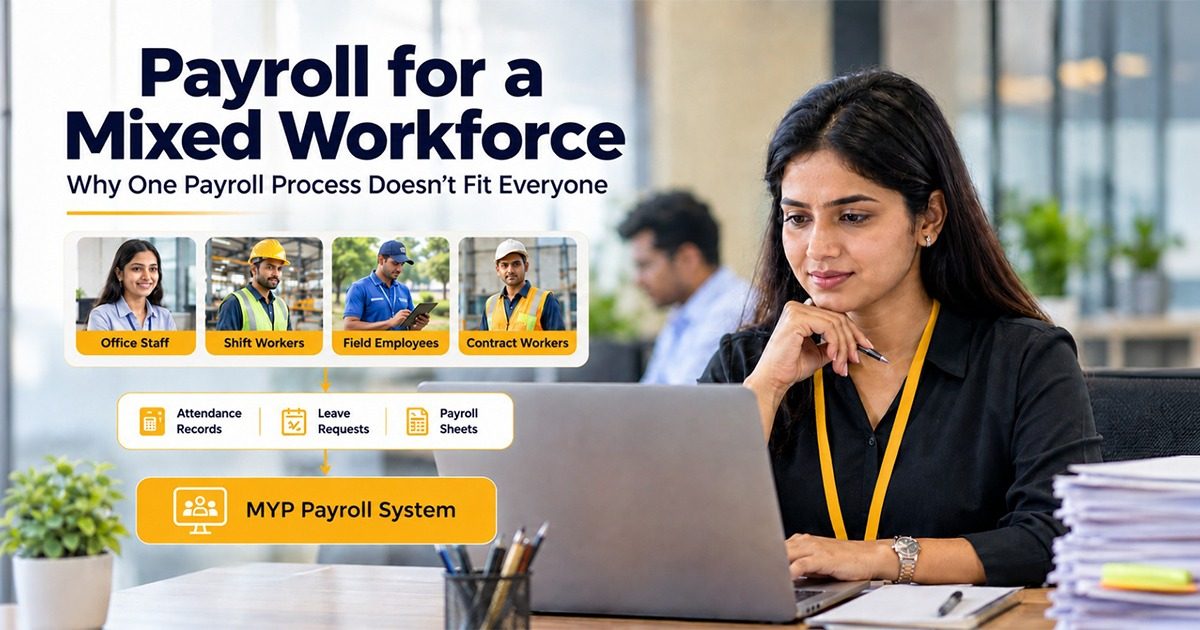
- Office staff on a fixed monthly salary, standard timings, a defined leave policy.
- Shift workers on rotating shifts, with overtime, late marks, night shifts and weekly offs that move around.
- Field employees who are never at the premises, so there is no gate, no register, no biometric punch.
- Contract or temporary workers on a different pay structure, different rules, sometimes different documentation entirely.
Four groups. Four different sets of logic for turning "what this person did in September" into "what this person gets paid on the 1st of October."
An office employee's salary is largely known in advance. A shift worker's salary genuinely is not — it depends on how many shifts they worked, which shifts, how much overtime, how many late marks, whether a weekly off was worked.
So payroll stops being a calculation and becomes a reconciliation. And reconciliation is where time goes.
Where it actually breaks
In most businesses this size, payroll doesn't fail in one big way. It fails in four small ways that compound.
1. The data arrives from four different places
Biometric logs for the factory floor. A physical register for the workers the device doesn't cover. WhatsApp messages for field staff. An email chain for leave approvals. Sometimes a supervisor's notebook.
Before anyone calculates anything, somebody has to sit and merge four sources into one sheet. That merge is manual, it happens every month, and it is where most errors get introduced — not in the salary calculation itself, but in the copying.
2. The rules live in someone's head
The overtime rate for shift workers. Which employee types are eligible for which leave. What happens when a weekly off is worked. How you treat a half-day for a field employee versus an office employee.
In a growing business, these rules usually exist as convention rather than configuration. Everyone knows them because one person knows them.
That works — until that person is on leave during the last week of the month, or a new joiner arrives and nobody is sure which rules apply, or the person leaves the company altogether. This is a quiet dependency, and most owners only notice it under pressure.
3. Corrections arrive after the calculation is done
This is the one that hurts most.
Payroll gets calculated. Then somebody flags a missing punch, or an approved leave that wasn't recorded, or an overtime entry on the wrong rate. Now someone has to reopen the whole sheet. They adjust formulas manually. Someone updates one column and forgets a dependent one.
And critically: nobody keeps a record of who changed what, or why. The corrected version simply overwrites the earlier one.
4. Nothing links back to anything
An employee asks why their salary is lower this month. To answer that properly, you need to open the attendance record, cross-check leave, check the overtime entries, and explain the deduction.
If those sit in separate files, the answer takes twenty minutes to assemble. So the honest answer usually becomes "it is correct, we have checked" — which resolves the conversation but not the doubt.
These four issues are why simply installing payroll software isn't enough on its own. The software has to actually handle the differences between employee types, not just digitize the spreadsheet.
Why the spreadsheet keeps holding
Here is the honest part: for a long time, the spreadsheet works.
At 8 employees, it's genuinely the right tool. By 15, it's still manageable. Around 25, someone starts staying late at month-end. Cross 40 employees across multiple types, and one person's memory and patience are the only things holding it together.
The spreadsheet doesn't collapse. It just quietly gets more expensive: more hours, more errors, more employee queries after every salary run, and more risk concentrated in whoever maintains it.
Most businesses don't switch because the spreadsheet broke. They switch after a specific month where it took too long, a mistake reached an employee's account, or the person who runs it was unavailable.
What changes with payroll software built for a mixed workforce
MYP Payroll is HR and payroll software built specifically for Indian businesses with a mixed workforce. It's designed around one idea: attendance and payroll shouldn't be two exercises someone reconciles by hand.
Different employee types can have genuinely different rules. Salary structures, leave rules, attendance rules, shifts, overtime rules, deductions and approval flows can each be configured differently for different groups within the same system. Nobody has to force office staff and shift workers into one common policy just to keep the sheet simple.
Attendance gets captured the way each group actually works. Direct biometric device integration for people on the premises. Biometric file import or Excel/CSV upload where devices already exist. Location and GPS-based attendance for field employees. Web check-in and check-out where that suits better. Four capture methods, one attendance record.
Attendance-to-payroll happens automatically, on your configured rules. Once you define shift, overtime, late-mark, half-day and weekly-off rules, attendance flows straight into the payroll calculation. Nobody merges four files into a fifth one. The merge step is the step that disappears.
After payroll runs: corrections, compliance and self-service
Corrections have a defined path. Employees raise attendance-correction requests. Managers approve them. The correction doesn't have to travel as a WhatsApp message. You can recalculate payroll after changes, but recalculation needs approval, and you can lock the period once it's final. MYP keeps an audit trail for important actions and changes, so a correction leaves a record instead of silently overwriting the old one.
Employee payroll software should mean employees can check things themselves. Through Employee Self Service, employees can view and download payslips, check their own attendance, apply for leave, see holidays and download Form 16 — without asking HR for each item. A good number of month-end queries are simply people wanting to see their own data.
Compliance calculations sit inside payroll, not beside it. MYP calculates PF, ESI, TDS and income tax deductions as part of the payroll run. It also generates the relevant reports and forms, ready for download.
Getting started: how MYP's payroll software gets set up
Assisted onboarding costs nothing extra. You can migrate existing employee data, salary structures, leave rules, attendance rules, employee types, shift and overtime structures using Excel templates, or let the MYP team handle setup and configuration for you. After that, you can modify any of it yourself.
For most businesses this size, the first month is the honest test: run it alongside your existing process and see how much of the last week of the month you actually get back.
See it on your own rules. MYP is payroll software built for Indian businesses with a mixed workforce. Book a demo on WhatsApp and we'll walk through how it handles your specific mix of employees — office, shift, field and contract — rather than a generic setup.
1. Can one payroll software handle office staff, shift workers and field employees together?
Yes — MYP Payroll lets you configure different salary structures, leave rules, attendance rules, shifts, overtime rules and approval workflows for different employee types within the same system. Office staff, shift workers, field employees and contract workers don't have to follow one common policy just to fit into a single sheet.
2. How does attendance data actually turn into a payroll calculation?
In MYP Payroll, attendance is captured through biometric integration, Excel/CSV upload, GPS-based check-in, or web check-in, depending on how each employee group works. Once shift, overtime, late-mark and weekly-off rules are configured, that attendance data flows directly into the payroll calculation, without anyone manually merging spreadsheets.
3. What happens if a mistake is found after payroll has already been calculated?
In MYP Payroll, payroll can be recalculated after changes, but recalculation requires approval before it's applied. Once a payroll period is locked following final approval, any further correction is a recorded, approved action, not a silent overwrite of the original numbers.
4. Does payroll software calculate PF, ESI and TDS, or does it also file the returns?
Payroll software like MYP Payroll calculates PF, ESI and TDS deductions as part of the payroll run and generates the relevant statutory reports and forms, including Form 16. It does not file or submit returns to government portals directly — the business, its accountant, or its CA still completes that step.
5. How does payroll work for field employees who don't use a biometric device?
In MYP Payroll, field employees can mark attendance using location or GPS-based check-in instead of a biometric device. That attendance record feeds into payroll the same way as biometric or manual attendance, based on whatever rules are configured for that employee type.